How to manage notifications on Neki
Manage Your Notifications on Neki
Your notification settings let you decide what updates you’d like to receive and how you’d like to stay informed. Whether it’s activity from your community, engagement on your posts, or platform updates, you’re always in control.
This guide walks you through how to find and manage your notification preferences step by step.
How to Access Notification Settings
Follow these simple steps to manage your notifications:
Step 1: Log in to your Neki account
Step 2: Go to your Profile
On your home page, look at the left panel and click on the Profile tab.
Step 3: Click the Edit icon
Next to your name, you’ll see an edit icon. Click on it to open your profile settings.
Step 4: Open Notifications

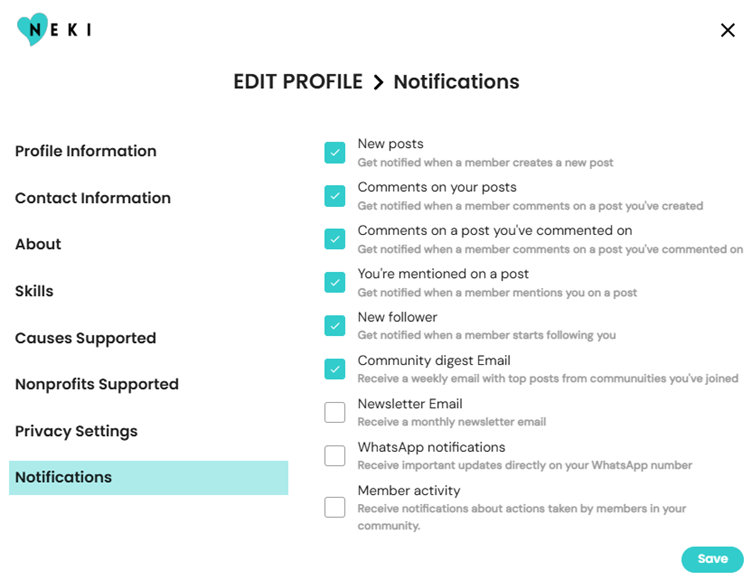
From the menu on the left, scroll down and select Notifications.
You’ll now see all the notification options available to you.
Notification Options Explained
You can turn each notification on or off based on what feels most useful to you.
📝 New posts
Get notified when a member creates a new post.
💬 Comments on your posts
Receive a notification when someone comments on a post you’ve created.
💭 Comments on posts you’ve commented on
Stay updated when conversations continue on posts you’ve engaged with.
📣 You’re mentioned on a post
Get notified when a member mentions you in a post.
👥 New follower
Receive a notification when someone starts following you.
📬 Community Digest Email
Get a weekly email with top posts from the communities you’ve joined.
📰 Newsletter Email
Receive a monthly newsletter with updates, stories, and highlights from Neki.
📱 WhatsApp notifications
Get important updates directly on your WhatsApp number.
🌱 Member activity(only available for community admins)
Receive notifications about actions taken by members in your community.
Saving Your Preferences
Once you’ve selected your preferred notifications:
- Click the Save button at the bottom of the page
- Your settings will be updated instantly

You can return anytime to update or change your preferences.
Notifications are meant to support your journey, not interrupt it. Choose the updates that matter most to you, and feel free to adjust them as your engagement on Neki grows.
✨You’re always in control of how you stay connected on Neki.✨